
HCX PlatformHotel Customer Experience

HCX HOTSPOT - The Internet

Easy connection.
Better experiences.

Your guest can easily connect.
Access, security and satisfaction are under your control.

Custom entrance screens for your hotel, flexible verification and central management. With HCX HotSpot, convert internet access into a part of your guest experience.

MicroTik and RADIUS support · Multi-facilities management

In your control.The right guest.
The right connection.
9:41
The Missouri

Welcome.

A good accommodation begins with a good connection.
HCX Platform

Connect to the Internet.

Choose the right entry method for you.

with my room informationfor the hotel guests
SMS confirmationAccess by phone number
Safe connection
The Representative Welcome Screen
After the connectionListen to the experience.

The guest satisfaction

Easy participationFlexible entry methods

Controlled accessSpeed, time and device limits

The apparent operationLive user and traffic tracking

Measurable ExperienceConnecting after the connection

In the eyes of the missionary

Guest internet login methods

The functioning of each facility is different. Create the entrance stream suitable for your business with room information, SMS, password or Quick Connect.

Acceptance and Verification

A welcome screen tailored to your hotel

A special welcome screen appears in front of the guest. Connect to the verification methods you choose, the access rules you define are applied.

Your guests participate in access to the internet with room information.

The Business ScreenCentral entrance managementAccess to the user
The HCX portfolioEffective Examples

Internet access based on length of stay

Continue with your room information.

Number of roomThe 204
Date of BirthGG / AA / YYY

This field shows the input experience; it does not create a real connection.

The reception screen is a design example. real guest data is not used.

The rules of business

Internet access policies

It is the beginning to know who is connected. Manage the connection time, speed and device limits according to your business needs.

The policeThe guest network
The speed limitUsers based
The connection timeSpecial to business
The device limitInternet packages

Presentation of the political structure

Usage Policy

Access by user group

Define the speed, time and number limit. Follow package-based use and paid internet options in the same operation.
The archive5651
Based on recordsRegular archives according to location
✓
Filtering based on historyeasy access to the time
✓
The connection pastDo not follow the records
✓

Representation of the Register Management

Cut and Cut

Access logs and history

Securely archive connection logs covered by Law No. 5651 Keep the records you need organized with property- and date-based tracking.

From the eye of the team

Central management of guest internet

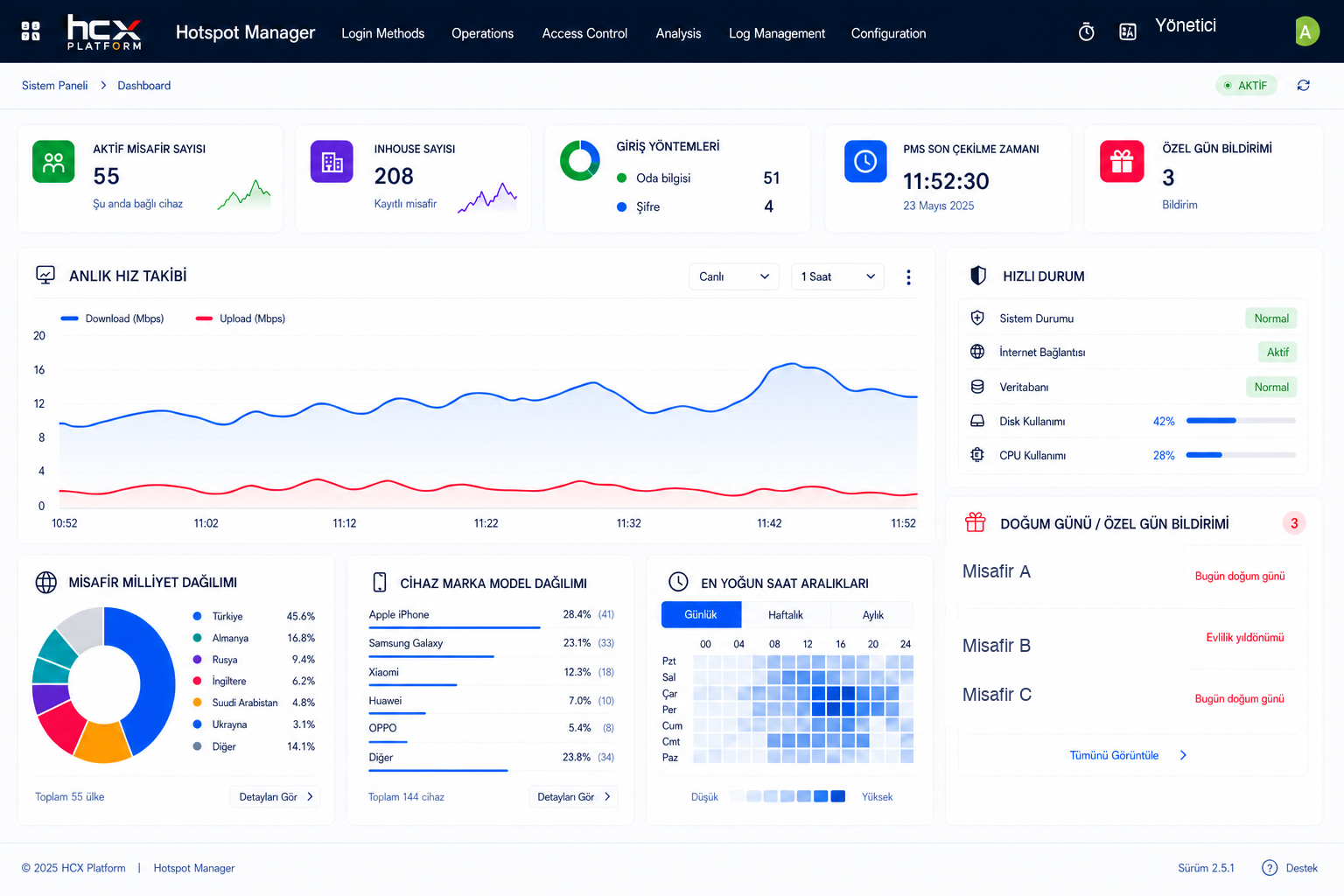
Active users, traffic, connection history and system status. The visibility that your operation needs is on the HCX HotSpot panel.

HCX HOTSPOT Panel of ManagementAnonymous Product Screen
HCX HotSpot Real Management Panel: Active Guests, Entry Methods and Live Traffic

Evaluate users, input methods and system status on the same screen.

Multiple facilities · MicroTik · RADIUS

Return to Relationship

Guest satisfaction surveys

Listen to your experience after your guest is connected to the internet. Submit automatic surveys with the satisfaction module connected to HCX HotSpot; evaluate feedback based on department, location and language.

  • Automatic connection after connection
  • Multi-language assessment and star rating
  • Department-based analysis and management summaries
  • Automatic e-mail reports
The satisfaction module works with HCX HotSpot.
The Voice of the Missionary

Your stay
How is it passing?

Share your experience with us.

Try to touch the stars.

Front deskCleanlinessGeneral experience
Examples of design · Answers are not recorded.
Beyond the link, understand your guest.

All parts together.

HCX HotSpot features

Check the scope of HCX HotSpot closely from the entry screen to reporting.

Safe Internet Access
  • Special Enterprise Screenshots
  • Confirmation by SMS
  • Entrance with room information
  • Entry with the password
  • Support for Quick Connect
  • User-based speed and time limits
  • The limit number of devices
  • Package-based Internet use
The Central Management
  • Live user tracking
  • The connection past
  • Multiple facilities and branch management
  • MicroTik and RADIUS
  • PMS connection
  • Traffic and system status
Legal registration management
  • 5651 log records
  • Safe log archive
  • Date and facility based registration
The guest satisfaction module
  • HotSpot connection after automatic survey
  • Special location
  • Department based analysis
  • The Star Assessment
  • Multi-language survey
  • Director’s report
  • Automatic e-mail reports
Sales and Reporting
  • Internet package sales
  • Analysis of income
  • Location based performance
  • Reporting based on history
  • Cancellation and return
  • PDF reports

Interested

Frequently asked questions about HCX HotSpot

Frequently asked questions about input methods, multi-facilities structure and survey module.

Do you have a different question?
What is Hotspot?

Hotspot is a set of systems that require an Internet access through a wireless network and that the connected user must verify himself by SMS, password or otherwise. HCX HotSpot combines this access with secure verification methods for hotels and similar, 5651 legal registration management and a central management panel.

In which sectors is Hotspot technology used?

Hotspot systems are generally used in many industries that offer internet access to guests or visitors, such as hotels, holiday villages, restaurants and cafes, as well as airports, hospitals, shopping centers, public transport and educational institutions. HCX HotSpot is now developed specifically for hotels, holiday villages and restaurants/cafes.

What is HCX HotSpot?

The price information is not shared. You can fill in the Offer Form for a special offer for your business.

Is the Customer Satisfaction (Anket) Module a separate product?

No is. The guest satisfaction module works connected to HCX HotSpot; it cannot be used independently without HotSpot.

What verification methods are supported?

SMS confirmation, room information, password and Quick Connect are supported.

How to keep the 5651 records?

Connection logs are safely archived; they can be traced based on date and facility.

Is it possible to manage multi-facet/facet?

Yes . MicroTik and RADIUS supported multi-facilities and branch management can be made from the central panel.

REQUEST A DEMO

Explore the solution for your business.

Leave your contact details and our team will show you how the product can work for your business.

HCX HotSpot